Customize the front-end viewer
Create a viewer theme, override it from a WordPress theme and work with the complete front-end data model.
On this page
- Create a front-end viewer theme
- Implement the theme interface
- Customize only the stylesheet
- Customize the HTML structure
- Customize view helpers
- Register the custom theme
- Integrate the viewer into a WordPress theme
- Structure of theme elements
- Top teaser
- Overall viewer
- Track information container
- Map container
- Front-end viewer data model
- LookupDataItem
- Main model
- Bike fields
- Hiking fields
- Train fields
- Relevant source files
Create a front-end viewer theme
A front-end viewer theme describes the trip summary viewer’s layout and styling. It contains the top teaser, the viewer inserted after the post or at a shortcode/block position, CSS styles and the JavaScript needed for interactivity. The JavaScript is not currently customizable.
Implement the theme interface
Customizable elements are formalized by Abp01_FrontendTheme:
| Method | Purpose |
|---|---|
includeFrontendViewerStyles() |
Enqueue viewer styles. |
registerFrontendViewerHelpers() |
Include view helpers when needed. |
renderTeaser(stdClass $data) |
Render the top teaser. |
renderViewer(stdClass $data) |
Render the viewer. |
getVersion() |
Return the current theme version. |
The plugin ships with Abp01_FrontendTheme_Default, the core implementation, and Abp01_FrontendTheme_Decorator, which uses overrides from the active WordPress theme and falls back to core files.
Customize only the stylesheet
For CSS-only customization, extend one of the supplied implementations. Extend the decorator if the active WordPress theme should still be allowed to override viewer files.
class My_Custom_Theme extends Abp01_FrontendTheme_Default {
    public function __construct(Abp01_Env $env) {
        parent::__construct($env);
    }

    public function registerFrontendViewerHelpers() {
        // Include custom helpers before the core helpers.
        parent::registerFrontendViewerHelpers();
    }

    public function includeFrontendViewerStyles() {
        // Keep this call to retain the original stylesheet.
        parent::includeFrontendViewerStyles();
        wp_enqueue_style(/* your stylesheet arguments */);
    }

    public function getVersion() {
        return '0.1.0';
    }
}
Use the original stylesheet and the element diagrams below as references.
Customize the HTML structure
Override individual rendering methods when only part of the structure changes. Implement Abp01_FrontendTheme directly when replacing the complete core structure.
- Required elements must retain the IDs and classes expected by plugin JavaScript.
- Tab navigation uses jQuery EasyTabs and must follow its markup requirements.
- The constructor must be
public function __construct(Abp01_Env $env).
Abp01_Env exposes getViewFilePath($viewFile), getViewHelpersFilePath($helperFile), getViewsDir() and getAjaxBaseUrl().
Customize view helpers
abp01_extract_value_from_frontend_data($data, $field)extracts a value from$data->info.abp01_format_info_item_value($value, $suffix)formats a value and optional suffix.abp01_display_info_item($data, $field, $fieldLabel, $suffix = '')renders one information item.
When implementing the interface directly, include custom helpers before the core helper file:
public function registerFrontendViewerHelpers() {
    // Include your own helper file first.
    require_once $this->_env
        ->getViewHelpersFilePath('controls.frontend.php');
}
Register the custom theme
Package the implementation as a WordPress plugin and select it with the abp01_get_frotend_theme_class filter during plugins_loaded. The hook retains the historical frotend spelling.
function my_custom_plugin_loaded() {
    add_filter('abp01_get_frotend_theme_class', function ($currentThemeClass) {
        return 'My_Custom_Theme';
    });
}

add_action('plugins_loaded', 'my_custom_plugin_loaded');
Integrate the viewer into a WordPress theme
The default decorator automatically looks for overrides inside the active WordPress theme. Create abp01-viewer, abp01-viewer/media/css and abp01-viewer/helpers, then add only the files you want to override. Templates receive the model through $data.
| Element | Path inside the theme |
|---|---|
| Top teaser template | abp01-viewer/wpts-frontend-teaser.php |
| Viewer template | abp01-viewer/wpts-frontend.php |
| Viewer stylesheet | abp01-viewer/media/css/abp01-frontend-main.css |
| Helper functions | abp01-viewer/helpers/controls.frontend.php |
For most projects, overriding only the stylesheet is safer and easier to maintain than replacing templates or helpers.
Structure of theme elements
Top teaser

Overall viewer
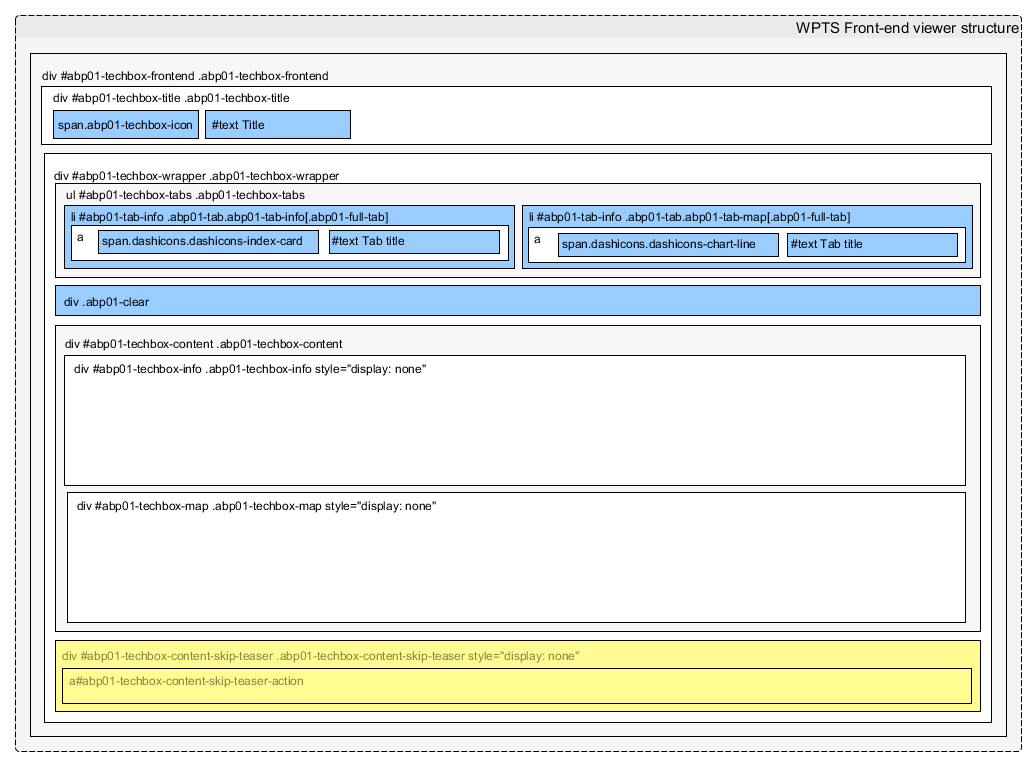
.abp01-full-tab; content containers are shown only while their tab is selected.Track information container
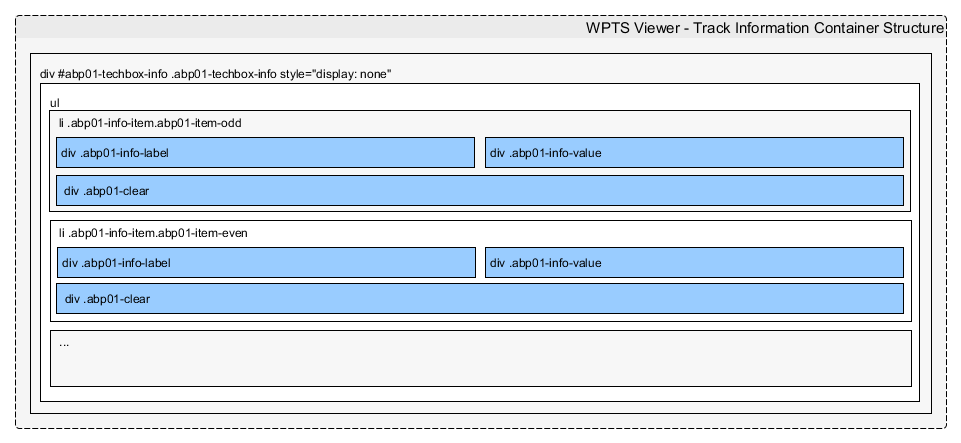
abp01-item-odd and abp01-item-even.Map container
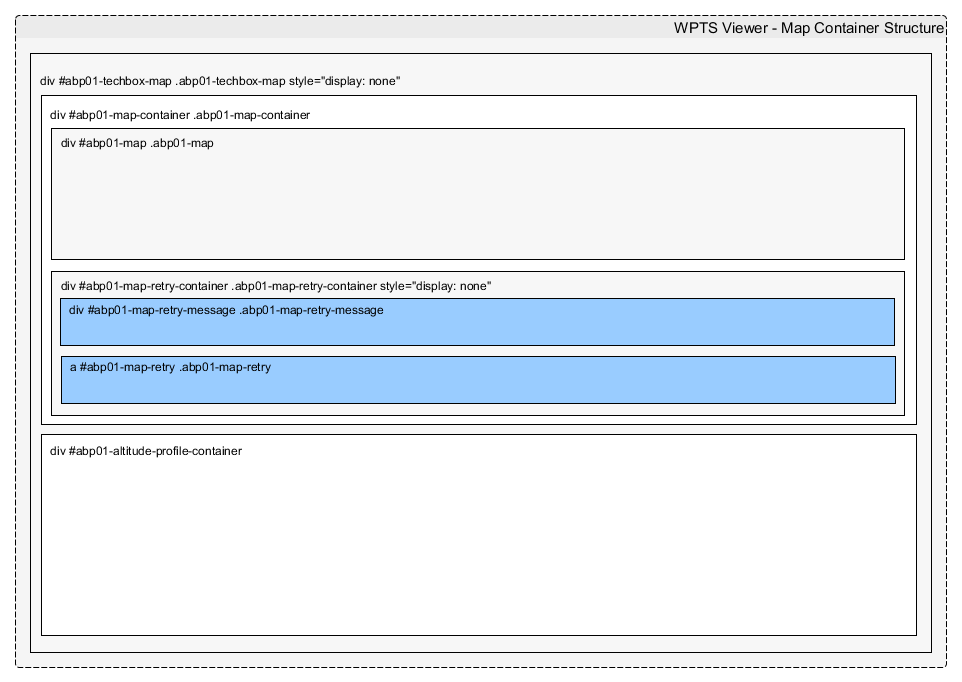
#abp01-map. Failed loads use the retry container, message and button. The optional altitude chart uses #abp01-altitude-profile-container.Front-end viewer data model
Viewer templates receive a plain stdClass, normally available as $data.
LookupDataItem
| Property | Type | Description |
|---|---|---|
id |
int |
Assignment ID. |
type |
string |
Lookup assignment type. |
label |
string |
Translated label, or the default label when no translation exists. |
hasTranslation |
boolean |
Whether a translation exists for the current language. |
Main model
| Property | Type | Description |
|---|---|---|
info |
stdClass |
Track-information data. |
info->exists |
boolean |
Whether trip information is available. |
info->isBikingTour |
boolean |
Whether this is a bike trip. |
info->isHikingTour |
boolean |
Whether this is a hiking trip. |
info->isTrainRideTour |
boolean |
Whether this is a train trip. |
track |
stdClass |
GPS track data. |
track->exists |
boolean |
Whether a GPS track is uploaded. |
postId |
int |
Associated post ID. |
ajaxUrl |
string |
Absolute admin-ajax.php URL. |
ajaxGetTrackAction |
string |
Action used to retrieve track details. |
downloadTrackAction |
string |
Action used to download the track. |
nonceGet |
string |
Nonce for retrieving track details. |
nonceDownload |
string |
Nonce for downloading the track. |
imgBaseUrl |
string |
Plugin image-directory URL. |
settings |
stdClass |
Snapshot of plugin settings. |
Bike fields
bikeDistance, bikeTotalClimb, bikeDifficultyLevel, bikeAccess, bikeRecommendedSeasons, bikePathSurfaceType and bikeBikeType are available below info.
Hiking fields
hikingDistance, hikingTotalClimb, hikingDifficultyLevel, hikingAccess, hikingRecommendedSeasons, hikingSurfaceType and hikingRouteMarkers are available below info.
Train fields
trainRideDistance, trainRideChangeNumber, trainRideGauge, trainRideOperator, trainRideLineStatus, trainRideElectrificationStatus and trainRideLineType are available below info.
Relevant source files
| File | Source |
|---|---|
| Top teaser template | wpts-frontend-teaser.php |
| Viewer template | wpts-frontend.php |
| Viewer CSS | abp01-frontend-main.css |
| Helper functions | controls.frontend.php |
| Viewer JavaScript | abp01-frontend-main.js |